Cloud Video Backup
Keep recorded video in secure cloud storage so footage is protected beyond the local recorder.
VIDEOLOFT CLOUD FROM ANY AI CAM
Videoloft records your existing compatible cameras to the cloud, with remote live view, playback and AI search. Connect through the Videoloft Cloud Adapter or the free Windows Software Bridge. No AnyAiCam appliance required.
VIDEOLOFT CLOUD VMS DEMO
Watch the Videoloft cloud VMS demo, then see how cloud recording, remote viewing and AI search work with the cameras you already have.
WHAT YOU GET
Your existing compatible cameras can record to the cloud, show live video remotely, send useful alerts and make important footage easier to find and share.
Keep recorded video in secure cloud storage so footage is protected beyond the local recorder.
View connected cameras from your phone, tablet, or computer after your account is activated.
Use people and vehicle detection to find important moments faster than reviewing normal footage.
Manage cloud access for offices, stores, warehouses, restaurants, and other business locations.
Cloud Storage Plans
Purchase cloud recording for your existing cameras and choose the storage duration, billing preference, and optional AI features that fit your site.
This is the simplest way to get cloud recording for your system. Cloud storage is billed monthly by Videoloft directly to the customer. New activations include a 30-day free trial before the first payment.
Flexible per-camera plans with optional AI features including Smart Motion, People Counting, and License Plate Recognition.
 Cloud Storage Plans
Free Option Available
Use the free Windows Software Bridge to test cloud recording with compatible cameras for 30 days without purchasing adapter hardware. If you decide not to continue after the trial, there is no adapter purchase left behind.
Already have an adapter? The wizard handles both options.
The Videoloft Cloud Adapter is the dedicated hardware option for customers who want cloud recording to keep running without relying on a laptop or desktop computer.
It stays connected as long as it has power and network access, making it the better fit for businesses, permanent installations and customers who do not want to leave a Windows PC running.
Customers can order the Videoloft Cloud Adapter and submit the cloud storage plan details the same day. ANY AI CAM handles the adapter hardware order, then uses the same request details to prepare the cloud account and recording plan.
8-channel Cloud Adapter hardware: $349. A 16-channel adapter hardware option is available at $399. Cloud recording is set up from the same order request and billed after activation.
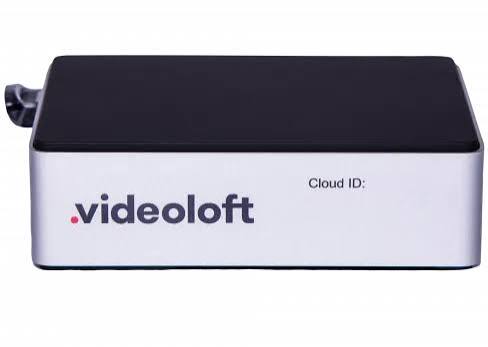 Cloud Adapter Mini

Mobile App Access
Customers use the Videoloft IP Camera CCTV App for cloud camera access after their account is created and onboarding is complete. The app helps customers view live video, check recorded footage, and stay connected to their cameras from their phone once the system is activated.
SEE WHAT YOUR CAMERAS CAN DO
Watch real examples of smart motion, people counting, license plate recognition and PPE detection. Then start with the cameras you already own.
See how people, vehicle, and animal events can be found faster than reviewing ordinary motion clips.
Watch on YouTube →See occupancy, foot traffic, and customer-flow reporting for stores, offices, and public spaces.
Watch on YouTube →See plate capture and search for parking areas, gated properties, and access-control use cases.
Watch on YouTube →See hard-hat, vest, and safety-equipment monitoring for industrial and construction sites.
Watch on YouTube →What ANY AI CAM Does
We do not travel to install cameras. We help customers choose compatible equipment, recover authorized access, verify network visibility, and connect supported cameras or recorders to Videoloft.
Keep compatible IP cameras or recorder systems instead of replacing everything.
Purchase compatible cameras and PoE equipment, then install them yourself or hire a technician in your city.
We help identify the approved reset process. Physical resets must be completed by the customer, manufacturer, or local technician.
After valid credentials are available, we can help connect supported devices and verify cloud viewing and recording.
Not included: onsite installation, cabling, ladder work, physical camera resets, or bypassing device security.
LOOKING FOR LOCAL RECORDING?
AnyAiCam VMS records locally on an AnyAiCam appliance or your own Ubuntu PC, with optional hybrid cloud event retention and AI analytics.