★ 30 Day Free Cloud Storage ★
NVR & DVR Setup
Two ways to bring your cameras to the cloud.
Whether your compatible IP cameras connect directly to the cloud or through an existing NVR system, the Videoloft Cloud Adapter bridges your system to the Videoloft cloud.
Video Compatibility
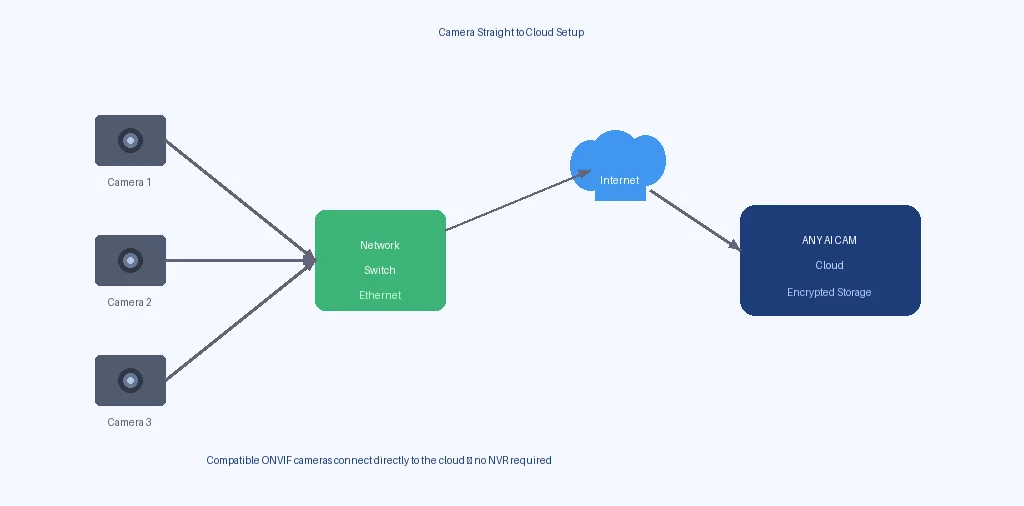
Camera straight to the cloud.
Record from compatible IP/network cameras straight to the cloud and reduce the need for a local NVR recorder.
Simplify the installation, save space onsite, and reduce the risk of recorder theft or failure.
Direct camera compatibility.
Axis
Dahua
Lorex
LTS
Hikvision
Reolink
TVT
Uniview
Vivotek
Hanwha Vision
Digital Watchdog
ONVIF Compatible
Existing System Path
Add cloud to your existing NVR or DVR.
Keep your existing cameras, wiring, and recorder. The Videoloft Cloud Adapter connects to your network and bridges your system to the ANY AI CAM cloud.
Your existing cameras and NVR stay exactly where they are. The Videoloft Cloud Adapter connects to your network alongside your recorder and bridges the video feed to the ANY AI CAM cloud. No need to replace cameras, run new cabling, or change how your system works day-to-day.
You keep all your local recording capabilities. The Videoloft cloud adds encrypted offsite backup, motion-triggered alerts, and 24/7 live viewing from any device.
Connection Paths
Choose how to connect your existing system to the cloud.
Your current cameras and recorder stay in place. ANY AI CAM reviews your setup and recommends the best way to add cloud connectivity.
1
Videoloft Cloud Adapter Path
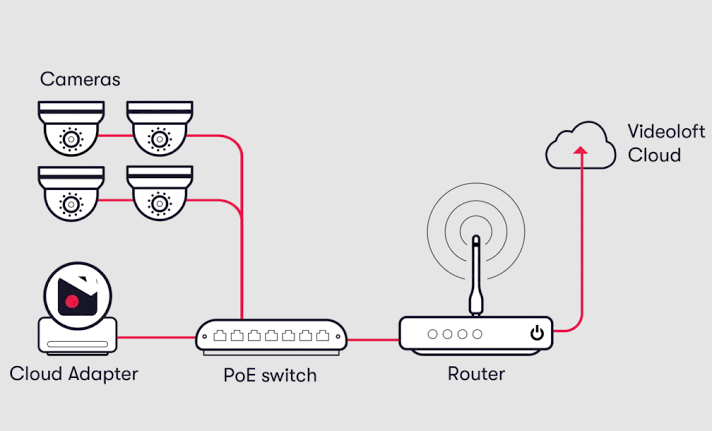
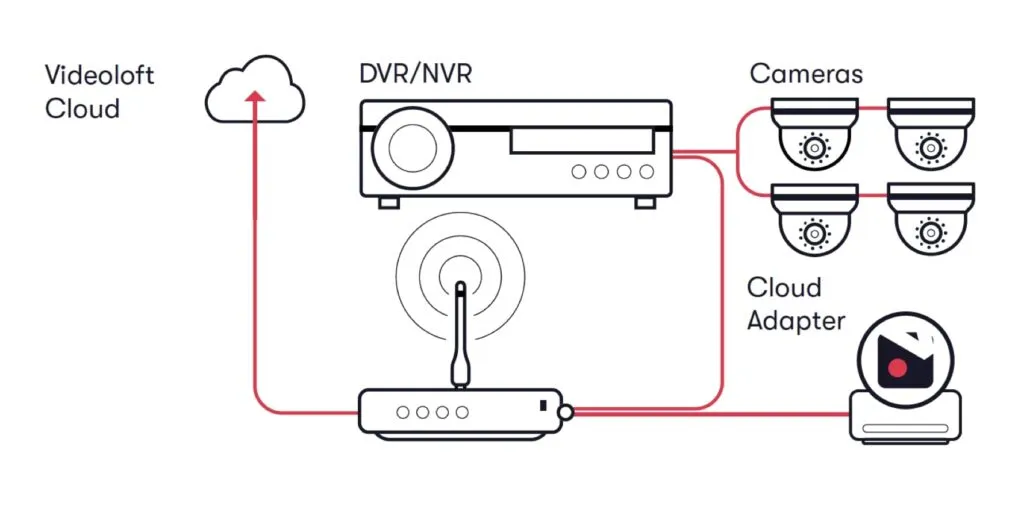
The Videoloft Cloud Adapter connects to your existing network alongside your NVR or DVR. It bridges your current recorder's video stream to the ANY AI CAM cloud - no computer needs to stay running, and your existing system continues to operate as normal.
- Works with most ONVIF-compatible NVRs and DVRs you already have
- Dedicated hardware - just plug it into your network
- 8, 16, 32, and 64-channel options to match your system size
- Your existing cameras and recorder stay unchanged
- Maintains connection even if a computer is turned off
- Good fit for Mac users or sites without a dedicated Windows PC
- Compare Adapter Options
2
Direct Cloud NVR
Some newer NVR models support direct cloud upload without any adapter or software. ANY AI CAM can confirm if your existing recorder supports this.
- Requires a compatible NVR with built-in cloud upload support
- Setup steps vary by manufacturer and firmware version
- Check Compatibility
How the Adapter Connects
Plug into your existing network, not your system.
Your Existing Cameras
Your compatible IP cameras stay connected to your existing network or NVR setup. Analog/coax DVR cameras are not directly compatible without a manual review or upgrade path.
- Keep your existing camera wiring and positions
- All existing recording schedules and motion settings remain
- Works with compatible IP/network camera systems
Your Existing NVR / DVR
Your recorder stays as your primary recording device. The Videoloft Cloud Adapter connects to your network alongside it - not in place of it.
- Local recording continues without interruption
- No firmware changes needed on your recorder
- Adapter connects to your network switch, not your recorder directly
The Videoloft Cloud Adapter
A small hardware device that connects to your network switch or router. It discovers your recorder on the network and securely transmits video to the ANY AI CAM cloud.
- Plug into any available Ethernet port on your network switch
- Automatically discovers compatible recorders on your network
- No computer needed - runs 24/7 on its own
- View adapter models and pricing
Visual Overview
How everything connects together.
- Cameras - Your existing cameras connect to your NVR or DVR as they always have.
- NVR / DVR - Your recorder continues local recording and connects to your network switch.
- Videoloft Cloud Adapter - Plugs into the same network switch, discovers your recorder, and sends video to the cloud.
- Router - The adapter uses your existing internet connection to reach the ANY AI CAM cloud.
- Videoloft Cloud - Your video is encrypted, stored offsite by Videoloft, and accessible from anywhere.
Your existing system never changes. The Videoloft Cloud Adapter connects to your network and bridges your recorder to the cloud.
Submit Setup Request
Requirements
What you need to add the cloud adapter.
Network Requirements
- Broadband internet connection (minimum 5 Mbps upload recommended)
- Network switch or router with an available Ethernet port for the adapter
- Your NVR and adapter must be on the same local network
NVR Requirements
- ONVIF-compatible NVR or DVR (most major brands supported)
- Network-connected recorder with accessible web interface
- Cameras already configured and recording on the NVR
ANY AI CAM reviews your specific NVR model and network setup during activation. If your recorder needs firmware updates or network changes, we guide you through the steps.
See How It Connects
Submit Setup Request
Before You Order
Not sure if your cameras will work?
Check whether your system uses compatible IP/network cameras first, then continue to the cloud setup wizard when it looks likely compatible.