★ 30 Day Free Cloud Storage ★

FREE SYSTEM ASSESSMENT

Connect your existing analog, IP, or hybrid camera system to AI cloud recording.

Tell us what you already have. ANY AI CAM will help identify your analog, IP, or hybrid system and determine the best path to AI cloud recording—without pushing unnecessary replacement equipment.

This check does not reset or bypass camera passwords.

Videoloft normally requires valid administrator credentials. When credentials are missing, use the manufacturer-approved recovery process or hire a local technician for any required physical reset.

HOW THE ASSESSMENT WORKS

A clear answer before you commit to new equipment.

Many camera systems are still useful, but customers are often told to replace everything before anyone carefully reviews what they own. ANY AI CAM takes a different approach.

  1. IdentifyTell us the camera, NVR, or DVR brand and model—or ask for help locating it.
  2. EvaluateWe determine whether the system is IP, analog, ONVIF-capable, and likely cloud-compatible.
  3. RecommendWe explain what can stay, what may need replacing, and whether local installation work is required.
  4. ConnectFor supported systems, we help activate and verify Videoloft cloud viewing and recording.

Quick Brand Check

Tell us about your existing system.

No download is required. This page does not scan your network, ask for camera passwords, or store camera credentials.

Analog, IP, and hybrid systems are supported. Compatibility and connection method can depend on the recorder brand and model, so we review the system before activation.
Get Compatibility Help

WHY ANY AI CAM

We evaluate first. We do not replace equipment by default.

Our role is remote camera-to-cloud guidance and activation—not nationwide physical installation. That lets us focus on helping you understand the system you already have.

Keep working equipment

Working analog cameras, IP cameras, DVRs, and NVRs may be able to stay in service instead of being replaced.

Plain-language recommendations

We explain why a device is compatible, uncertain, or unsuitable so you can make an informed decision.

Local installation when needed

If new wiring, ladders, or physical camera work is required, hire a qualified installer in your city for that portion.

Remote cloud activation

Once the system and valid administrator access are available, we help connect and verify the cloud service.

Not sure what is connected to your network?Ask about an authorized remote review performed with your permission. We never bypass passwords or access equipment without authorization.
Request Personal Assistance

Compatibility Guide

See how existing camera systems connect.

Use the visual guides and brand examples below, then complete the interactive readiness check above.

Video Compatibility

Camera straight to the cloud.

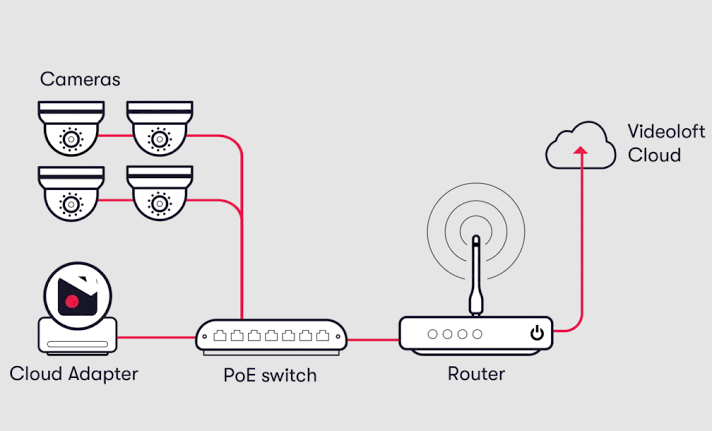
Camera straight to cloud setup with cameras, cloud adapter, PoE switch, router, and Videoloft Cloud

Connect supported analog, IP, or hybrid camera systems to cloud recording using the appropriate recorder or adapter path.

Simplify the installation, save space onsite, and reduce the risk of recorder theft or failure.

Direct camera compatibility.

Axis Dahua Lorex LTS Hikvision Reolink TVT Uniview Vivotek Hanwha Vision Digital Watchdog ONVIF Compatible

Cloud Backup Option

Cloud + recorder.

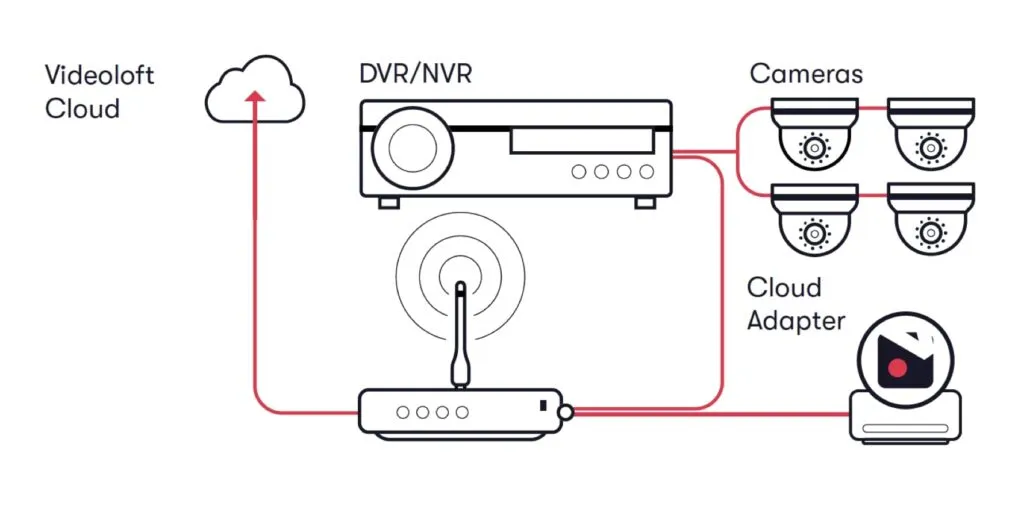
Cloud plus DVR NVR recorder setup with cameras, router, cloud adapter, and Videoloft Cloud

You may still want local recording. But what if you need to keep video longer than the recorder can store, or want protection against recorder theft or damage?

Add cloud backup to your local recorder to get the best of both worlds.

Direct recorder compatibility.

ONVIF Compatibility

Many camera brands work through ONVIF. Specific results can vary because different brands implement ONVIF standards differently.

Amcrest Avigilon Bosch H.VIEW i-PRO ONWOTE Panasonic Sony Wisenet

ANY AI CAM supports devices with ONVIF profiles S and T, but compatibility should be confirmed before activation.